
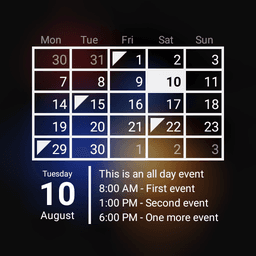
Screenshots
About Calendar Widget Month + Agenda
Calendar Widget Month + Agenda brings your events into focus right on your home screen with a beautifully designed, dual-view calendar widget. Unlike traditional calendar apps, this lightweight widget combines month view and agenda view seamlessly, giving you both the big picture and upcoming event details at a glance.
Stay on top of your schedule without cluttering your phone. The widget syncs with Google Calendar, Outlook Calendar, and Facebook events, pulling all your important dates into one unified display. You'll see colorful event markers scattered across the month grid, making it instantly clear which days have activities planned. Below the calendar grid, an organized agenda section displays your upcoming events in chronological order, so you never miss what's coming next.
Customization is where this widget truly shines. Tailor the appearance to match your home screen aesthetic—adjust colors, sizing, and layout options to suit your preferences. Optional week numbers help you track your schedule by the week if needed. The widget also displays contact birthdays and holidays automatically, ensuring important personal dates never slip through the cracks. Tap any date to open your default calendar app for detailed event management, creating a smooth workflow between your widget and full calendar experience.
Compatibility is built in. The widget works seamlessly with most calendar applications available on the platform, so regardless of which calendar service you prefer, Calendar Widget Month + Agenda integrates effortlessly. The design takes inspiration from clean, intuitive interfaces, offering a polished look that feels native to your device.
This is a trial version with no time limit—use it free indefinitely. After 7 days, you'll have the option to purchase a license key to unlock additional customization options and support ongoing development. The choice is entirely yours. Remember: this is a widget, not a standalone calendar app, so simply add it to your home screen to get started.
If you encounter any issues or have feature suggestions, the developer welcomes your feedback. Enjoy the simplicity and power of Calendar Widget Month + Agenda, and consider rating or commenting if you find it valuable.
Pros & Cons
Pros
- Syncs with Google Calendar, Outlook, and Facebook events in one unified view
- Dual month and agenda display lets you see both overview and upcoming details
- Extensive customization options for colors, sizing, and layout to match your home screen
- Automatically displays contact birthdays and holidays so important dates don't slip by
Cons
- Free trial limited to 7 days before prompting purchase of license key for full features
- Widget-only design means you cannot manage or edit events directly from the home screen
- Relies on your calendar apps to sync; compatibility issues may occur with less common calendar services
- Requires calendar app permissions to access events, which involves sharing calendar data with the widget
Related Apps

Codex
AI code agent that writes, tests, and refactors code from natural language—integrate with GitHub and VS Code.

Sibelius
Music notation software for composing orchestral, jazz, and vocal scores professionally.

Scribus
Desktop publishing and page layout design with professional typography, PDF export, and free open-source tools.

CmapTools
Concept mapping software to visualize ideas, connect concepts, and collaborate in real time with multimedia support.

Get Coins for TIK Live Video
Mary Studio
Earn real coins for TikTok live videos by completing daily tasks. Boost engagement instantly.

GOSI
GOSI
Social Insurance services in Saudi Arabia—secure access to benefits, documents, and wellness tracking with GOSI.
Latest Articles

7 best Anki alternatives for desktop in 2026 (we tested every one)
Jul 11, 2026

7 best AppFlowy alternatives for desktop in 2026 (self-hosted included)
Jul 11, 2026

Best AI admin task automation apps for desktop in 2026 (we tested 7)
Jul 11, 2026

Best AI coding tutor apps for desktop in 2026 (we tested 7)
Jul 11, 2026
Best apps for AI red teaming on desktop in 2026 (free and paid)
Jul 11, 2026